
Blog / How-to

How To Reset a Ford Door Code Without the Factory Code

Closeup of a Vintage Black Car

If you're a Ford owner, Ford's keyless entry system provides you with an added layer of convenience and security. Whether you're returning to your car after a long day or need to give someone else temporary access to your vehicle, the keyless entry system allows you to lock and unlock your car without a traditional key. 

But what happens if you forget or lose your door code? There's no need to panic — with a few simple steps, you can reprogram your Ford's door code and regain access. Read on and let our expert team at John Kennedy Ford of Conshohocken take you through the process.

What Is the Ford Keyless Entry System?

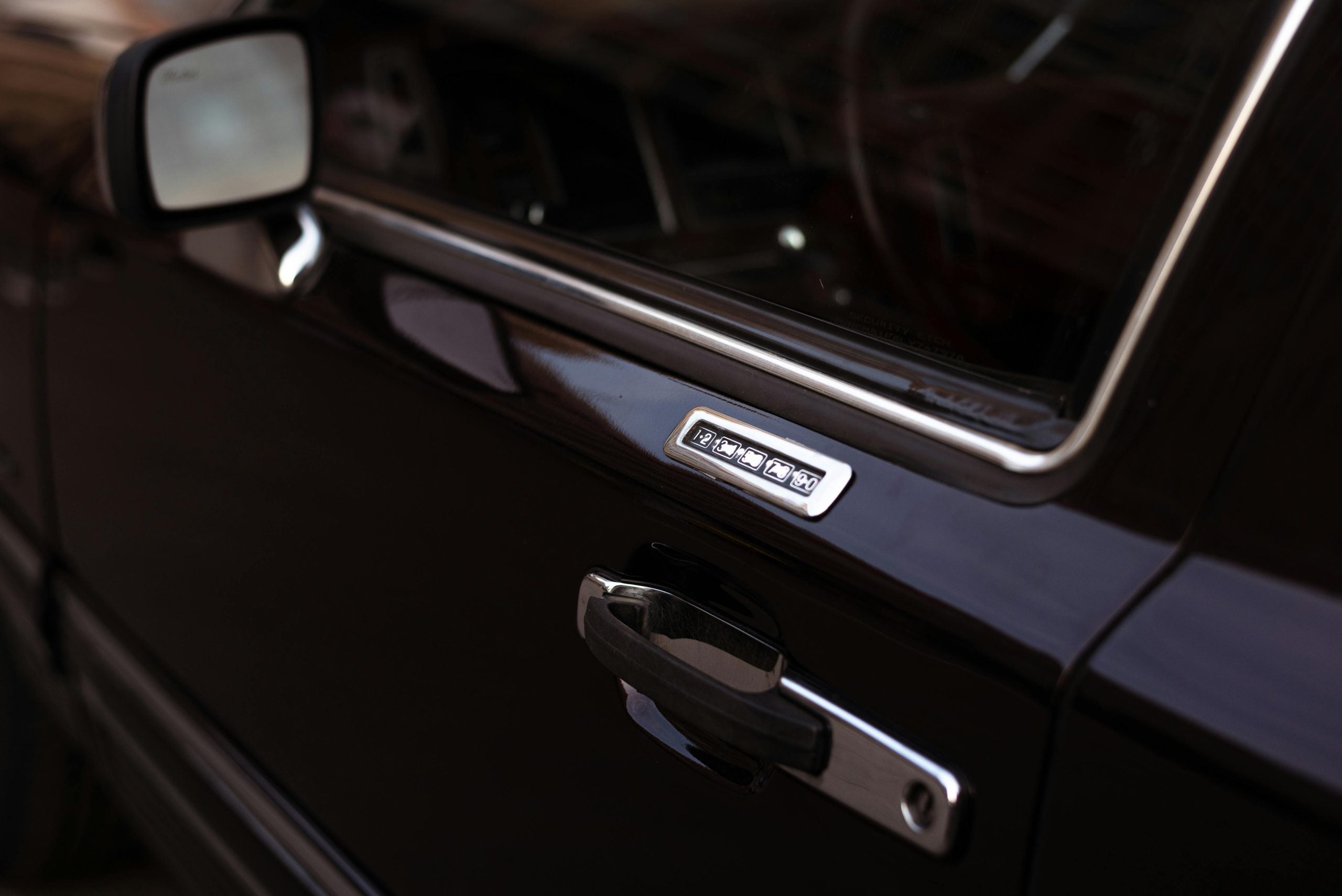
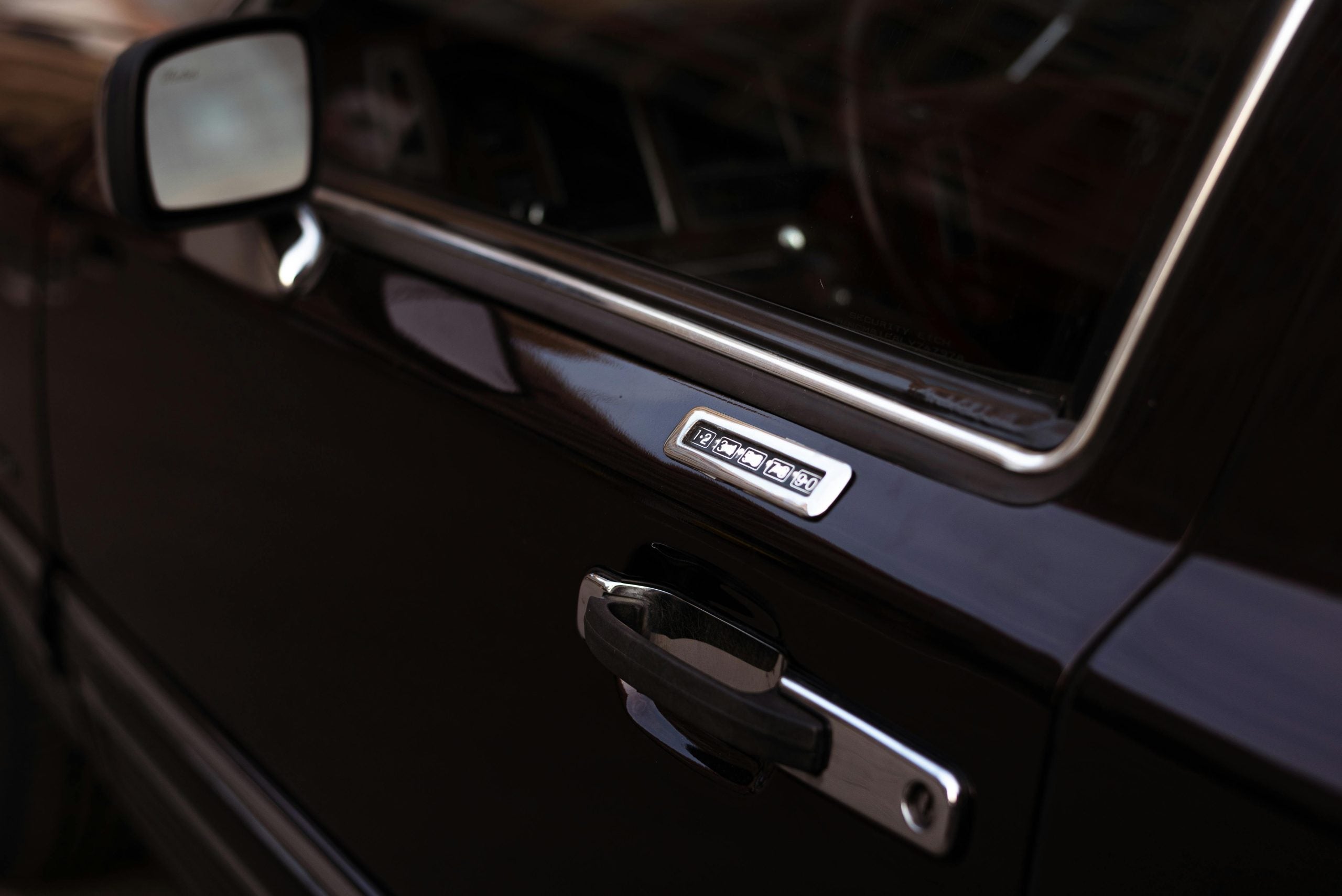
Ford's keyless entry system is a convenient feature that allows you to lock and unlock your car doors without using a traditional key. Instead, the system uses a preset numerical code entered via the vehicle's keypad, which is typically located on the driver's side door, to unlock the car.

The system is programmed with a factory default five-digit code, which you can customize. Some models even allow you to set additional codes, providing access for other authorized people. The extra convenience the system offers is great when you have your hands full or can't easily find your car keys.

How Does the Keyless Entry Code Work?

Your keyless entry code is stored in the car's body control module (BCM), which is essentially the brain of the system. This module controls the various electronic components in the vehicle, including the keyless entry keypad. When you enter the correct code, the BCM sends a signal to the vehicle's locking mechanism to unlock the door.

The door code works as a secondary security measure, allowing you to access the vehicle without needing a physical key or remote fob. The option to add more codes also lets you share your vehicle with others using unique codes for easy management.

Benefits of Having a Keyless Entry System

The keyless entry system offers a range of benefits:

  • Convenience: You can unlock and lock your doors with just the touch of a button without needing to search for your keys.
  • Security: If you lose your keys or fob, you can still gain access to your car. With the ability to manage additional personal codes, you can easily restrict other users’ access.
  • Customization: You can set and change codes whenever needed. This provides flexibility in managing who can access your vehicle.
  • No need for a fob: Unlike remote key fobs, which can run out of battery or be misplaced, the keypad system doesn't require you to carry anything extra.

Step-By-Step Guide to Resetting Your Ford Door Code Without the Factory Code

If you've lost the factory code or simply want to reset your code for security reasons, for example, after lending someone your car — or even if there's been a problem with the keypad that requires a reset to restore full functionality — don't worry. You'll have to access your vehicle's BCM, but with these basic steps, you'll be back cruising the streets of Conshohocken in no time.

Tools and Requirements Before You Begin

Before starting the process, you'll need a computer with FORScan downloaded, a Ford-approved on-board diagnostics (OBD) scanner with a USB connector, and access to your Ford's BCM, which is typically located under the dashboard near the driver's side or behind the glove compartment. Make sure you have plenty of time and work carefully.

Locating the BCM

To begin the reset process, you'll first need to locate the BCM. In most Ford models, this can be found under the dashboard near the driver's side footwell or behind the glove compartment. In some cases, it may be located behind the fuse box or other interior panels.

Obtaining the Factory Code 

Plug the OBD scanner into the vehicle's OBD-II port (usually located under the dashboard) and connect it to a USB port on your computer. Turn the car's ignition on, open the FORScan program, and follow the prompts to find the factory-set keyless entry code, which can never be erased. 

Reprogramming the Door Code

After you have the factory code, enter it on your car's keypad to make sure it works. You can set a new code of your choice that you can easily remember. To set the new code: 

  1. Enter the factory code. 
  2. Press and hold the 1/2 button on the keypad for two seconds. 
  3. Within five seconds, enter your new five-digit code. 
  4. Press and hold the 1/2 button again. 
  5. The doors should lock and unlock to show the new code has been accepted.

You should still be able to use the factory code as well as your new code, so keep both codes in a safe place in case you have any further issues.

When To Seek Professional Help

If you're not comfortable working with your vehicle's electronic systems or don't have access to the necessary diagnostic tools, it's always a good idea to seek professional help. At our service department at John Kennedy Ford of Conshohocken, our certified technicians can reset the door code for you without any risk to your vehicle.

Do you have questions about resetting your door code? Contact us now for expert help or schedule a service appointment.
Posted in:

Related Posts

Black Dashboard and Steering Wheel of a Car

Ford Shifting Rough? How to Reset Your TCM (3 Easy Methods That Actually Work)

Is your Ford struggling with jerky acceleration or unusual shifting? These frustrating transmission problems might have a simple fix. Resetting the transmission control module (TCM) can solve these headaches without an expensive trip to the mechanic. In this article, we'll walk you through three proven ways to reset your Ford's TCM yourself, which can potentially save you hundreds of dollars in repair bills and get your car running smoothly again. more Schedule Service Understanding Ford Transmission Control Module Reset: When and Why You Need It The TCM in your Ford is like the brain of the transmission. It checks the speed, throttle position, and engine load to figure out the right shift points. It also keeps track of your driving habits and learns from them over time. But this data can get messed up or out of date, which can lead to sudden changes, delayed engagement, or gear changes that don't happen when they should. Ford F-150s from 2020 to 2025 have had a lot of powertrain recalls. For example, 2020 models had problems with the gearbox position indicator, while 2021 trucks had problems with the control module. The cost of repairs ranges from $1,000 to $3,000. Common signs are four- to five-second delays while going from first to second gear, followed by sudden jolts that can make the tires spin dangerously even when the car is just going slowly. When you push the gas pedal down hard, cars usually shift normally, which means there are electronic problems instead of mechanical ones. When you reset your TCM, it's like resetting your phone. It wipes out all the stored patterns and gives the system a fresh start. They work well for fixing electronic problems, but they won't address mechanical problems like worn clutches or valve bodies. Step-By-Step Guide: How To Reset Ford Transmission Control Module The basic pedal reset requires no tools. First, park on flat ground with the parking brake engaged, and turn the key so the dashboard lights come on without starting the engine. Press the gas pedal fully for 15-20 seconds, then while holding the pedal, turn the key off. Release the pedal and wait for two minutes before starting the engine. The battery disconnect method works for thorough resets. Disconnect the negative battery terminal, which is marked with a minus, using a wrench. Press the horn for 30 seconds to drain residual power. Leave the battery disconnected for a minimum of 15 minutes. This forces all computers, including the TCM, to factory reset. Reconnect the battery securely and start the vehicle, making sure to allow it to warm up before driving. For complete resets, OBD2 scanners are used. Professional scanners, such as the Innova 5610, offer more functions than budget DIY options but are more expensive. Connect the scanner to the OBD2 port (this should be under the dash near your left knee), then access the transmission menu and select Clear Adaptations or TCM Reset. Ford Model-Specific Reset Procedures for 2025 While the basic reset methods work on most Fords, certain models have their quirks. F-150 trucks usually work well with all three reset approaches. Their electrical systems handle battery disconnects without drama, and the roomy engine area makes reaching the battery a breeze. Many F-150 owners claim that the basic pedal reset fixes their shifting issues. Fusion, Explorer, Ranger, and EcoSport models also generally respond well to standard reset tricks without any special tweaks. Focus and Fiesta models, with the notorious PowerShift dual-clutch transmission, need special care. These transmissions have a history of serious TCM problems and typically need longer adaptation time after a reset. So don't panic if shifting doesn't feel right for the first 50-100 miles. If in doubt, open your owner's manual or ask a pro. Some newer Fords have extra security features that might affect how you reset the system. Troubleshooting Common Reset Issues Some Fords respond better to battery disconnects than pedal resets, while others need OBD2 scanners. If all three reset methods fail and problems persist, then you're dealing with mechanical issues, such as worn parts or low fluids. Error codes reveal what the issue is. Common TCM codes include P0700 (transmission control system malfunction), P0715 (input/turbine speed sensor circuit problems), and P0722 (no signal from the output speed sensor circuit). Codes returning immediately after clearing indicate that professional help is needed. TCM repair costs range from $300-$500, with complex cases reaching $1,500. Seek professional help if you've tried all reset methods unsuccessfully, hear grinding noises, spot fluid leaks, or smell burning odors. Multiple failed resets suggest a complete TCM failure. For complex issues, contact our experienced Ford technicians and schedule service with us at John Kennedy Ford Conshohocken. Post-Reset Adaptation and Learning Process Don't expect smooth shifts immediately after TCM resets, as your transmission needs relearning time. Initial symptoms, such as rough shifting or thumping sensations, are normal. Guided relearning with capable scanners takes 10-20 minutes plus a short road test. DIY resets need driving experience through light acceleration and braking cycles that allow natural gear progression. Avoid aggressive driving during the first 50-100 miles while establishing new baselines. Drive gently during adaptation. Use smooth throttle inputs, consistent speeds, and automatic shifting rather than manual mode. Most owners see improvements within a week. As this process allows for optimization based on current conditions, many drivers report better performance due to corrupted data being cleared. Prevention Tips: Maintaining Your Ford TCM Health Prevention beats repair when it comes to TCM troubles. Ford Edge models with 8F57 transmissions need fluid checks every 30,000 miles or two years. Frequent towers should change their vehicle's fluid every 60,000 miles. Using the wrong transmission fluid causes TCM confusion and shifting problems, so always check your Ford's fluid specs before changing it. Neglected maintenance, dirty or low transmission fluid, aggressive driving, and TCM issues will all cause your transmission to snowball over time. TCMs can also fail from excessive heat, bad sensors, or moisture exposure. Philadelphia's steamy summers and frigid winters put extra stress on your vehicle's electronics. Regular checkups can catch problems before you get stranded in Pennsylvania traffic. TCM care isn't rocket science; just make sure to address small transmission issues immediately. Stick to Ford-approved transmission fluid and change it on schedule, even if it looks clean, and go easy during extreme conditions, such as bumper-to-bumper traffic, long idle periods, or heavy towing. For model-specific advice, check out our how-to guides to keep your transmission running smoothly. Get Professional Ford Transmission Service When You Need It When DIY fixes aren't working, don't wait until your transmission dies completely. Professional service provides advanced diagnostic tools, genuine Ford parts, and experienced mechanics to work on your vehicle. Contact us at John Kennedy Ford Conshohocken for your next transmission service. Our technicians will fix your transmission troubles right the first time. We understand what makes your Ford tick and how to handle southeastern Pennsylvania driving conditions. Our team's Ford know-how can get you back on the road quickly and safely, whether you need a TCM reset or a serious transmission fix.

Closeup of a Vintage Black Car

Locked Your Keys in Your Ford F-150? Here’s What To Do Next

Has this happened to you? You've just slammed your F-150's door shut and spotted your keys sitting on the driver's seat. Don't panic. Ford has several ways to solve the problem. Our John Kennedy Ford Conshohocken team has compiled this guide to help you get back into your vehicle quickly. more Quick Assessment: Determine Your Ford F-150's Model Year and Features First, determine the year your truck was made. Check your owner's manual if it's not locked in the glove box, or locate your vehicle identification number (VIN). The VIN is a 17-character code that provides a wealth of information about your truck. Knowing the year will tell you what security features it has. Most F-150s made before 2025 come with keyless entry keypads on the driver's door. The VIN has three main sections: the first three characters indicate who built it, characters four through eight describe your vehicle, and characters nine through 17 provide specific details, such as the model year. Most importantly, the tenth character indicates the year it was made. You'll also want to check if your truck has FordPass Connect (usually found in 2017 and newer models) or a proximity key that works without being inserted. Look for any aftermarket alarm systems that could complicate the installation. Keep in mind that older and newer F-150s have completely different security setups, so knowing what you're working with saves time. Immediate Solutions: Built-In Ford Features To Try First Try Ford's built-in solutions first. If your truck is 2017 or newer, the FordPass app allows you to unlock doors remotely. Download it, create an account, and link your VIN. For keypad-equipped trucks, find the five buttons on your driver's door and enter your factory code. Every truck has a default five-digit code; some models also allow additional codes for family members. If you've forgotten your code, you can look it up on Ford's website. The 2025 F-150 doesn't have door keypads on any model. F-150s from 2015 or later are equipped with Intelligent Access. Hold your spare fob against the door handle. If that doesn't work, open the fob to find a physical key inside. Our John Kennedy Ford team can assist you if needed. We offer a mobile service that'll come to you. DIY Unlocking Techniques: Safe Methods for Different F-150 Generations When Ford's built-in solutions don't work, you may need to get creative — but be cautious. For older trucks (pre-2015 models), learning how to unlock a Ford F-150 with the coat hanger method may work, but you must be gentle to avoid damaging your weather stripping and window parts. Middle-aged F-150s (2009-2014) might yield to a Slim Jim or plastic wedge, but again, use caution. We don't recommend DIY solutions for F-150 models 2015 or newer. Their security systems are both complicated and easily damaged. Car forums may offer certain tricks or suggest particular tools, but without proper know-how, you risk damaging your truck. You may need to call our team at John Kennedy Ford Conshohocken. Professional Help Options: When To Call the Experts Sometimes, you need a professional, especially with newer trucks that are equipped with numerous security features. Most licensed locksmiths in the Montgomery County area work 24/7; this solution is handy if it's after business hours. Ford Protect's extended service plans include 24/7 roadside help for lockouts, flat tires, empty gas tanks, and dead batteries. AAA, car insurance, and Ford Roadside Assistance typically cover lockouts as well. When calling for help, have your location and truck details ready. Emergency Situations: Special Circumstances and Solutions Some lockouts require quick action. It's both a security and safety risk if you've locked your keys inside with the engine running, so don't leave a running truck. Call 911 immediately if your kids or pets are trapped inside, especially in hot weather. Prevention Strategies: Avoiding Future F-150 Lockouts Keep spare keys in secure locations, such as magnetic lockboxes, with trusted neighbors, or with a friend. Set up your FordPass app before a lockout happens, and keep your phone's battery charged. Try building habits such as patting your pocket for keys before locking up. Replace your key fob batteries regularly, and consider keeping a spare battery in your wallet for emergencies. If you live in the Conshohocken area, save our service department number along with local locksmith numbers in your phone now. Model-Specific Considerations for Different F-150 Generations Different F-150 generations need different approaches. The 2021 through 2025 models feature the latest FordPass technology and security systems that work best through their apps or with a professional intervention. The 2015 through 2020 trucks have Intelligent Access as well as keypads. The 2009 through 2014 models use traditional keys with manual unlock, while the 2004 through 2008 trucks have simpler setups. Pre-2004 trucks have basic locks and straightforward solutions. If you need parts or have questions about your F-150's security features, our John Kennedy Ford Conshohocken parts team is here to help. Get Professional Help for Your Ford F-150 in Conshohocken Today Getting locked out of your F-150 is frustrating, but you have options, from Ford's built-in solutions to professional help in Conshohocken. What works best depends on your truck's age and your specific situation. Contact our John Kennedy Ford Conshohocken team if you need immediate lockout assistance, want your spare keys programmed, or have questions about your F-150's security systems.

Steering Wheel of Ford Vehicle

How To Change the Battery in a Ford Key Fob

A key fob makes life with your Ford easy, but it's such a pain when that Ford key battery is low or dead. Don't stress because swapping out that battery is quick, costs next to nothing, and you can do it at home in a few minutes. At John Kennedy Ford Conshohocken, Pennsylvania, we've put together this guide to show you how to change your Ford key fob battery, including some handy tips for keeping it working well. more Schedule Service Message Us Call Now Understanding Your Ford Key Fob That little remote on your keychain is a pretty smart device. Your Ford fob lets you lock and unlock doors without fumbling for keys, pop the trunk while carrying groceries, and start your car from inside on freezing mornings. It's not only about saving time; remotes add that extra security layer that traditional keys can't match. Some Ford models have added some cool features to their key fobs. Imagine sitting at your desk when dark clouds roll in and you click a button and your car windows close. These nifty extras make daily driving less of a hassle and more enjoyable. How do you know when your Ford key battery needs replacement? There are a few warning signs to watch for. Normally, your fob should work from 30 to 50 feet away, but if you suddenly have to stand right next to your car for it to respond, you're mashing buttons repeatedly, or there's a lag between clicking and action, it's likely time for a new battery. Preparing To Change Your Battery It's necessary to get a few things ready before we explain how to open your Ford key fob. These are the items you'll need: Small flathead screwdriver New battery — CR2032 or CR2025 — check your car's manual for the battery type Clean lint-free cloth Tweezers Small 1.4 mm or 2.4 mm precision screwdrivers Before cracking open your fob, wipe it down. Handle your new battery carefully, touching the edges only, as your fingerprints contain oils that can mess with the battery's contact points. These simple steps stop dirt from sneaking inside, where it could cause problems. Please don't chuck the old battery in the trash; dispose of it following the regulations in your area. Step-By-Step Guide To Changing the Battery Press the button to pop out the metal key. You'll be able to see a small gap or seam in the plastic case. Slip your flathead screwdriver into the gap and twist gently until the two halves separate. Be patient because rushing this step risks you cracking the plastic or damaging something inside. When you see the battery, make sure to take notice of the way it's facing. Either take a mental snapshot or grab a pic with your phone. Carefully pry out the old battery — the tweezers can help. Place your new battery in the same position. Most CR2032 and CR2025 batteries have a "+" marked on one side, which typically faces upward in Ford fobs. Make sure the battery is completely flat and doesn't wiggle around. Align the halves of the fob and press them together gently until you hear a click. Slide the key blade back into position, press each button on your fob to check they're all responding, and walk a short distance away and test again. If everything is working, congratulations, you successfully changed your Ford key fob battery. Troubleshooting Common Issues If it's not working, here are some common issues that can cause problems. First, check that your battery is correctly inserted, not upside down. If that's not it, inspect your fob closely for hairline cracks or water damage. A hard drop or accidental washing machine trip causes internal damage no battery swap can fix. If your battery orientation is correct and there's no visible damage, try moving to a different location because nearby electronics can jam your fob's signal. Your neighbor's garage door opener, security systems, or those cool LED lights might be the culprits. If there's still nothing, a reset might help. The exact button combo varies by Ford model and can be found in your owner's manual. It typically involves holding down specific buttons for several seconds. Maintenance Tips for Your Ford Key Fob A little TLC goes a long way. Rule number one is to keep it dry because remotes don't play well with water — rain, pools, and washing machines are bad news. Watch temperature extremes, as fobs left in a hot car or forgotten in the icy cold can cause their battery to drain faster and damage electronic components. When not in use, store your fob away from other keys and metal objects. As for cleaning, less is more. A soft, slightly damp cloth works wonders on dirty exteriors. Skip harsh cleaners that might seep inside or damage the plastic casing. If the buttons feel sticky, a gentle pass with a wooden toothpick around the button edges often clears gunk. Don't fidget with your fob or click buttons out of habit, as each press drains the battery a little more. Battery life can vary between drivers, with the average ranging between two to three years. Some folks manage a decade from a single battery, while others burn through one annually. Battery life depends on usage patterns and fob features because a keyless entry system battery works harder since it's constantly communicating with your car. Mark your calendar for a yearly battery check — it beats getting stranded when your fob suddenly quits. Keeping Your Ford Key Fob Running Smoothly Changing your key fob battery is a simple fix that can save the hassle of dealership visits or service fees. Most battery swaps go smoothly, but you might hit a snag that means you need professional attention. For those times, our technicians at our service center have your back. We know every inch of your Ford vehicle and can sort out anything from tricky key programming to major repairs. Schedule service online, drop by, or contact us when you need a helping hand. We're ready to get you back on the road.